New AI Scams Are Stealing House Deposits: How To Stay Safe Online
Author:Tooba
Released:November 29, 2025
Cybercriminals have begun using AI to hijack real estate transactions, often targeting people during high-stakes moments like buying a home. One wrong click, and a house deposit vanishes into an offshore account. These scams are getting more polished, harder to detect, and dangerously effective.
If you're navigating real estate deals, handling large transfers, or storing sensitive documents online, here are the practical tools, services, and habits that can keep your information—and your money—safe.
Use Verified Document Exchange Platforms
What’s happening: Scammers are mimicking emails from lawyers, agents, or title companies. They send realistic-looking messages with altered payment instructions. These attacks usually involve either deepfake-style email impersonation or spoofed file-sharing links.
Solution: Use platforms built specifically for secure document exchange. Avoid casual use of Gmail, Dropbox, or WeTransfer for important financial steps.
DocuSign With Advanced ID Verification
Used widely in real estate for signing contracts. Add-ons include identity verification through photo ID or selfie matching.
Best for: Title agents, real estate attorneys, brokers
Pricing: From $15/month per user; ID verification is extra
Setup effort: Low for signers, moderate for businesses configuring integrations
Limitation: Doesn’t fully protect against email impersonation if used outside a secure portal
Clio For Real Estate Law Firms
Practice management software with secure client portals. Enables safe document sharing and internal messaging.
Best for: Law offices handling closings or escrow
Pricing: Starts at $39/user/month
Setup effort: Moderate; requires onboarding and training for staff
Limitation: Overkill for one-time buyers or small transactions
Avoid Email For Payment Instructions
What’s happening: AI tools can write emails nearly indistinguishable from real ones. If a scammer gains access to an inbox—yours or your agent’s—they can sit and wait for the right moment to redirect funds.
Solution: Use encrypted messaging apps or verified portals for all communication involving wire instructions.
ProtonMail
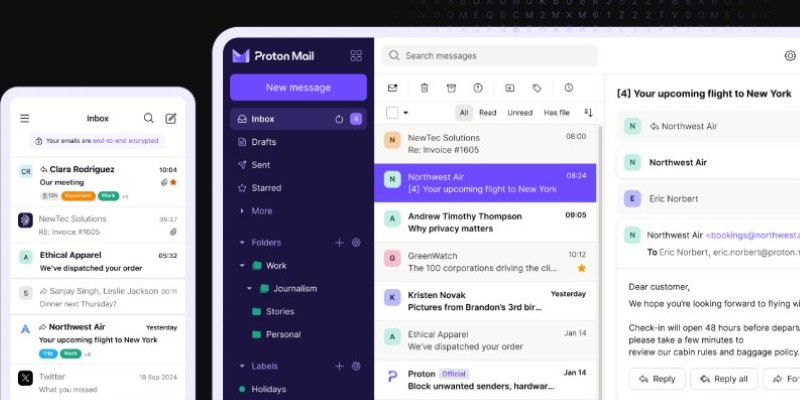
End-to-end encrypted email, hosted in Switzerland. Ideal for sensitive communication.
Best for: Buyers who want a secure alternative to Gmail during the homebuying process
Pricing: Free for basic; $4–$10/month for extra storage and features
Setup effort: Low
Limitation: Does not protect recipients if they’re using insecure email
Signal
A private messaging app that supports disappearing messages, file attachments, and encrypted calls.
Best for: Agents and clients who need fast, secure communication
Pricing: Free
Setup effort: Low
Limitation: Not widely used in professional real estate contexts yet
SafeWire
A tool designed specifically to verify wire instructions in real estate transactions.
Best for: Real estate offices and title companies
Pricing: Custom quotes
Setup effort: High for businesses, zero for clients
Limitation: Only works if all parties agree to use it
Verify Email Domains And Signatures
What’s happening: Many scams use slight email domain variations—like replacing an “m” with “rn” or using a .net instead of a .com. When AI writes the body of the message, these small signs are easy to miss.
Solution: Use browser extensions or tools that flag suspicious senders and verify digital signatures on emails.
Canary Mail
Offers built-in PGP encryption and email authentication indicators.
Best for: Users who want to ensure email authenticity at a glance
Pricing: Free basic version; premium starts at $20/year
Setup effort: Low
Limitation: Only works with supported email providers
Mimecast
Enterprise-grade email security used by financial firms and legal teams. Includes anti-impersonation protection.
Best for: Agencies and law firms involved in large transactions
Pricing: Starts around $3–$5 per user/month
Setup effort: High; requires IT support
Limitation: Not useful for individuals
Enable Account Monitoring And Access Alerts
What’s happening: AI is speeding up credential stuffing attacks. A leaked password can be tested across dozens of services in seconds. Once scammers gain access, they can quietly monitor communications and wait for financial opportunities.
Solution: Use services that alert you to new logins, suspicious access, or data breaches in real time.
1Password With Watchtower
Includes breach monitoring and dark web alerts for any saved credentials.
Best for: Anyone storing financial or legal login credentials
Pricing: $2.99/month (individual); $4.99/month (family)
Setup effort: Moderate; requires moving logins from browser to app
Limitation: Doesn’t prevent access if two-factor authentication is not used
Microsoft 365 Business With Defender
Includes advanced threat protection, login alerts, and cloud file access tracking.
Best for: Small firms managing multiple users or shared accounts
Pricing: From $6/month per user
Setup effort: Moderate to high, depending on team size
Limitation: Needs some admin setup for full protection
Use AI To Fight AI
What’s happening: Cybercriminals are using generative AI to create phishing emails that bypass traditional spam filters. They personalize tone, language, and timing to increase the odds of tricking victims.
Solution: Use AI-enhanced threat detection tools that identify patterns traditional filters miss.
Abnormal Security

Uses behavioral profiling to catch email attacks that don’t include links or attachments.
Best for: Businesses handling large volumes of external email
Pricing: Enterprise; requires demo and quote
Setup effort: High; usually deployed via Microsoft 365 or Google Workspace
Limitation: Not for individual users
Avanan (A Check Point Company)
Designed for real-time AI-based phishing protection. Integrates with Microsoft, Gmail, and Slack.
Best for: Mid-size companies needing extra filtering on top of cloud email
Pricing: Per-user pricing based on features
Setup effort: Medium
Limitation: Limited benefit for single users or families
Double-Check Every Wire Transfer
What’s happening: The most common scam method involves emailing fraudulent wire instructions, usually at the last minute. These messages are written to sound urgent and professional. Even experienced buyers and sellers have been tricked.
Solution: No technology fully replaces human verification. Always confirm payment instructions by phone or in person with a known contact—not by replying to email.
Best Practices
Ask your agent or attorney to give you a pre-agreed passphrase to confirm authenticity when calling about payments.
Do not rely on email for final payment steps, even if it appears legitimate.
Be suspicious of any pressure to move fast or update payment details.
Stay Proactive, Not Just Reactive
AI scams often start with overlooked details like an unsecured email or a rushed payment step. Use verified platforms, encrypt your communications, and confirm instructions by phone. Don't wait for signs of fraud—set up protections before money moves. Simple tools like 1Password or Signal can close the gaps scammers exploit. A few precautions now can prevent irreversible losses later, especially during high-value transactions like buying a home.